https://www.youtube.com/watch?v=QPEUU89AOg8&list=LL&index=1
이번 2학기 때 진행되는 텀프로젝트에서 api를 이용해보고 싶어 예습 겸 영상을 시청하게 되었다. 조코딩님의 영상을 참고해 학습했다.
Kakao Developers
카카오 API를 활용하여 다양한 어플리케이션을 개발해 보세요. 카카오 로그인, 메시지 보내기, 친구 API, 인공지능 API 등을 제공합니다.
developers.kakao.com
사용한 api는 카카오로, 책검색에 대한 간단한 웹을 따라 만들며 api의 개념을 학습해보았다.
먼저, 아래의 공식사이트에서 jQuery 라이브러리와 Ajax 예제 코드를 이용했다.
여기서 jQuery란 자바스크립트를 더 간편하게 사용할 수 있도록 도와주는 라이브러리이다. 즉, 자바스크립트의 복잡한 코드를 더 짧고 직관적으로 쓸 수 있게 만든 도구라고 보면 된다.
Ajax는 웹 페이지를 새로고침하지 않고도 서버와 필요한 데이터를 주고받아 해당 부분만 비동기적으로 업데이트하는 기술이다. 여기서 비동기적이라는 표현을 처음 접해서 알아봤는데, 여러 작업을 동시에 독립적으로 처리하는 방식을 뜻한다.
https://api.jquery.com/jQuery.ajax/
아래 2개의 코드는 영상을 보면서 작성해본 코드이다. html이나 js 기본적인 것들은 알고 있어서 이해하기 어렵지는 않았던 거 같다. 그리고 api를 사용할 때는 카카오톡에서 api를 발급받고 나와있는 예시 그대로 작성하면 되니 편리했다.
<!DOCTYPE html>
<html lang="ko">

<head>
    <meta charset="UTF-8">
    <meta name="viewport" content="width=device-width, initial-scale=1.0">
    <title>API 연습</title>
</head>

<body>
    <h1>테스트</h1>
    <p></p>
    <script src="https://code.jquery.com/jquery-3.7.1.js"
        integrity="sha256-eKhayi8LEQwp4NKxN+CfCh+3qOVUtJn3QNZ0TciWLP4=" crossorigin="anonymous"></script>
    <script>
        $.ajax({
            method: "GET",
            url: "https://dapi.kakao.com/v3/search/book",
            data: { query: "미움받을 용기" },
            headers: {Authorization: "KakaoAK api키"}
        })
            .done(function (msg) {
                console.log(msg.documents[0].title);
                console.log(msg.documents[0].thumbnail);
                $( "p" ).append( "<strong>"+msg.documents[0].title+"</strong>" );
                $( "p" ).append( "<img src='"+msg.documents[0].thumbnail+"'/>" );
            });
    </script>
</body>

</html>
<!DOCTYPE html>
<html lang="ko">

<head>
    <meta charset="UTF-8">
    <meta name="viewport" content="width=device-width, initial-scale=1.0">
    <title>API 연습</title>
</head>

<body>
    <h1>테스트</h1>
    <input id="bookName" value="" type="text">
    <button id="search">검색</button>

    <p></p>
    <script src="https://code.jquery.com/jquery-3.4.1.js"
        integrity="sha256-WpOohJOqMqqyKL9FccASB9O0KwACQJpFTUBLTYOVvVU=" crossorigin="anonymous"></script>
    <script>
        $(document).ready(function () {
            $("#search").click(function () {
                $.ajax({
                    method: "GET",
                    url: "https://dapi.kakao.com/v3/search/book?target=title",
                    data: { query: $("#bookName").val() },
                    headers: {Authorization: "KakaoAK api키"}
                })
                    .done(function (msg) {
                        console.log(msg.documents[0].title);
                        console.log(msg.documents[0].thumbnail);
                        $("p").append("<strong>" + msg.documents[0].title + "</strong>");
                        $("p").append("<img src='" + msg.documents[0].thumbnail + "'/>");
                    });
            });
        });
    </script>
</body>

</html>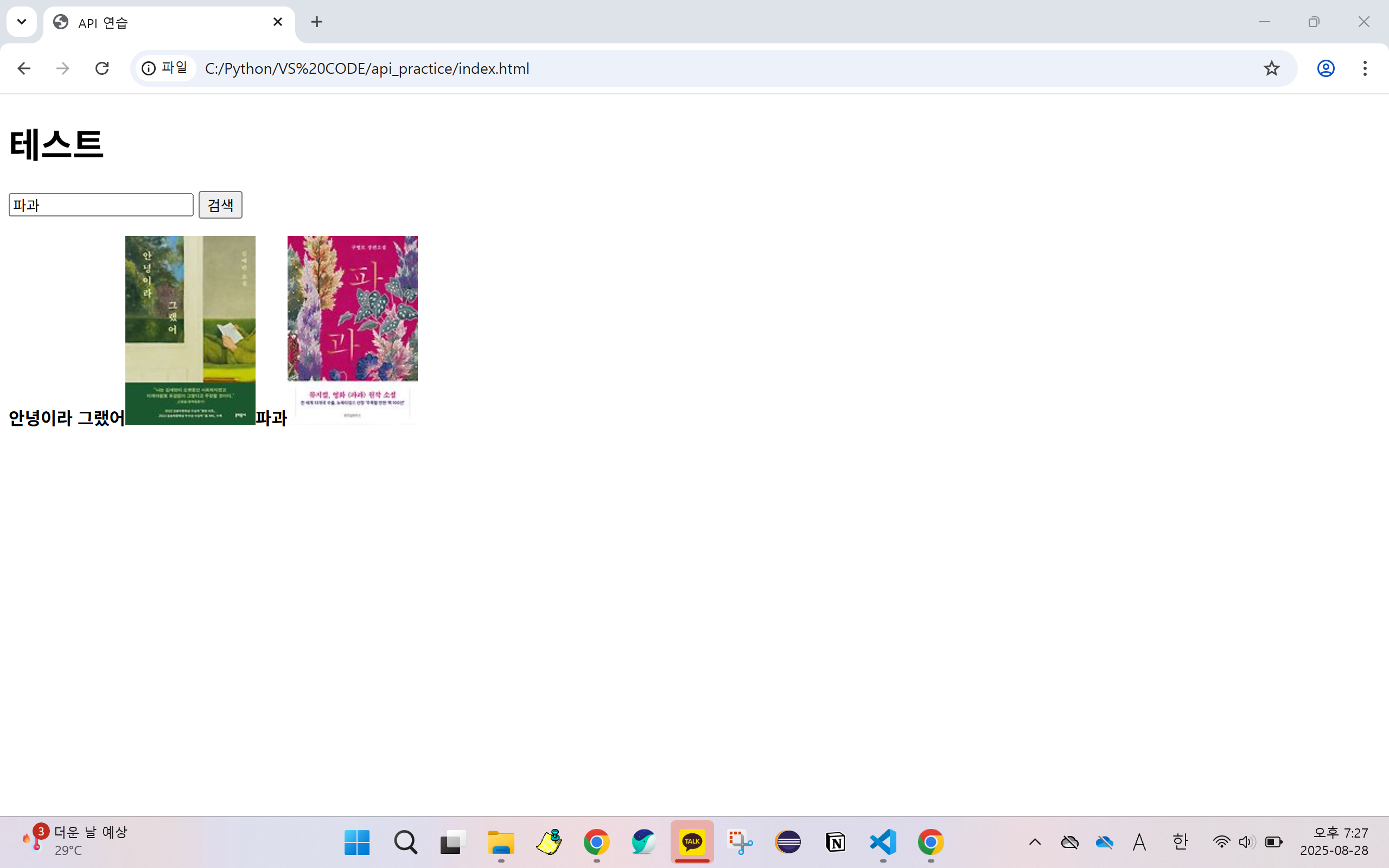
여기까지 작성하니 원하는 책을 검색하고 결과를 출력하는 것 까지는 됐다. 하지만 검색 후 다른 책을 찾으고 하면 원래의 검색결과가 삭제되지 않은 채 유지됐다.
그래서 검색을 할 때마다 기존 검색 결과는 삭제되고 검색결과도 여러개 출력해보는 방향으로 개선해보기 위해 코드를 수정해보았다.
- $("#result")를 통해 id="result"인 <p> 태그를 선택
- empty() 함수로 선택한 요소 안의 내용물을 전부 지움
- for문을 통해 여러 검색 결과를 출력
<!DOCTYPE html>
<html lang="ko">

<head>
    <meta charset="UTF-8">
    <meta name="viewport" content="width=device-width, initial-scale=1.0">
    <title>API 연습</title>
</head>

<body>
    <h1>책 검색</h1>
    <input id="bookName" value="" type="text">
    <button id="search">검색</button>

    <p id="result"></p>
    <script src="https://code.jquery.com/jquery-3.7.1.js"
        integrity="sha256-eKhayi8LEQwp4NKxN+CfCh+3qOVUtJn3QNZ0TciWLP4=" crossorigin="anonymous"></script>
    <script>
        $(document).ready(function () {
            $("#search").click(function () {
                $("#result").empty();

                $.ajax({
                    method: "GET",
                    url: "https://dapi.kakao.com/v3/search/book",
                    data: { query: $("#bookName").val() },
                    headers: {Authorization: "KakaoAK api키"}
                })
                    .done(function (msg) {
                        for (let i = 0; i < msg.documents.length; i++) {
                        console.log(msg.documents[i].title);
                        console.log(msg.documents[i].thumbnail);
                        $("p").append("<strong>" + msg.documents[i].title + "</strong><br>");
                        $("p").append("<img src='" + msg.documents[i].thumbnail + "'/><br><br>");
                        }
                    });
            });
        });
    </script>
</body>
</html>
아래와 같이 출력된다.

지난 학기에는 자바와 자바스크립트, html만 써서 jsp 파일을 만들고 웹페이지를 제작했는데, 이번에 배운 API 활용법을 바탕으로 더욱 발전된 웹페이지를 개발해보고 싶다.